Equations
An equation is a set of terms and operators arranged to make some mathematical statement.
Consider the equation:
a = b + c
Where the terms and operators are:
- terms:
a,b,c - operators:
=,+
An equation can have different forms. One form is above, but it can be rearranged into a different form:
a - b = c
In FigureOne, an equation is a collection (FigureElementCollection) of terms and operators (which are FigureElementPrimitives). A form defines the layout of terms and operators to create an equation. An equation can have many forms, and animation can be used to move between forms.
As the equation, terms and operators are all FigureElements, then they have all the same interactivety and animation abilities as shapes and text.
Quick Start
First let's create an equation, with red as the default color:
const equation = figure.collections.equation({ color: [1, 0, 0, 1] });
Next lets add the definitions for the terms and operators, or the equation elements. The keys of the object are unique identifiers that will be used in the equation forms to layout the elements appropriately. The values of the object are the text to display in the equation, or objects that define the text with additional options including formatting.
equation.addElements({
a: 'a',
b: 'b',
c: { text: 'c', color: [0, 0, 1, 1] },
equals: ' = ',
times: ' \u00D7 ',
});
The simplest form defintion is one that lays out the elements in a line. Here the array values are the unique identifiers (the keys) of the addElements object:
equation.addForms({
a: ['a', 'equals', 'b', 'times', 'c'],
});
An array of elements is called an equation phrase. In the example above, the form is a simple phrase, but in more complicated examples there may be several nested phrases.
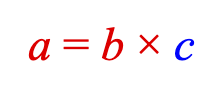
Finally, we can add the equation to the figure and show the form:
figure.add('equation', equation);
equation.showForm('b');
Symbols and Equation Functions
Mathematics has many special symbols that operate on terms, or annotate an equation. These symbols and their associated terms usually have a special layout.
FigureOne treats symbols like any other equation element, and uses FigureElementPrimitives to draw them. FigureOne then provides a series of functions that can layout terms around these symbols.
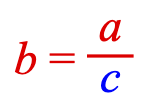
Let's take the equation from the last example, and show the form as a fraction.
Start by adding a vinculum symbol (with id 'v') to the equation's elements:
equation.addElements({
v: { symbol: 'vinculum'},
});
The equation is a FigureElementCollection with an eqn property that contains equation specific information, such as forms and special layout functions, such as frac. Let's use this to add the form:
const e = equation.eqn.functions;
equation.addForms({
b: ['b', 'equals', e.frac(['a', 'v', 'c'])],
});
Finally, we can display the form:
equation.showForm('b');
Combine all the steps above gives:
const equation = figure.collections.equation({ color: [1, 0, 0, 1] });
equation.addElements({
a: 'a',
b: 'b',
c: { text: 'c', color: [0, 0, 1, 1] },
v: { symbol: 'vinculum'},
equals: ' = ',
times: ' \u00D7 ',
});
const e = equation.eqn.functions;
equation.addForms({
a: ['a', 'equals', 'b', 'times', 'c'],
b: ['b', 'equals', e.frac(['a', 'v', 'c'])],
});
figure.add('equation', equation);
equation.showForm('a');
Equation Animation
Equations can animate between forms. For example, to animate from form a to b in the equation above:
equation.showForm('a');
equation.goToForm({
form: 'b',
animate: 'move',
duration: 2,
});
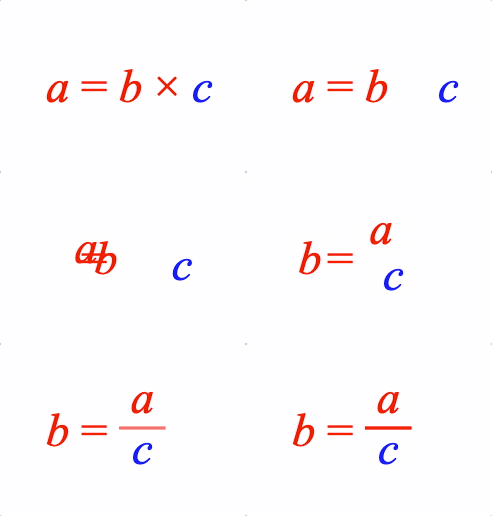
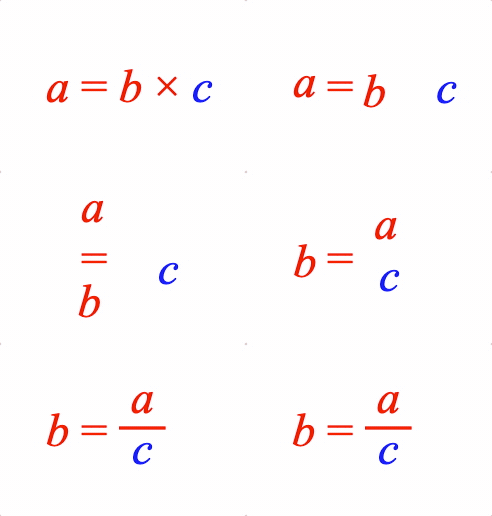
The animation can be improved by moving the terms of the equation in curves instead of linearly. To do this we can use the object definition of a form that also defines translation animation properties:
equation.addForms({
bCurve: {
content: ['b', 'equals', { frac: ['a', 'v', 'c'] }],
translation: {
a: { style: 'curve', direction: 'up', mag: 0.8 },
b: { style: 'curve', direction: 'down', mag: 1.2 },
},
},
});
equation.showForm('a');
equation.goToForm({
form: 'bCurve',
animate: 'move',
duration: 2,
delay: 1,
});
Object Definition
Similar to shapes and text, the same equation above can be defined with an options object. For complicated equations, options objects can be used with code folding in an IDE to more easily read and navigate an equation definition. Also, because object form is JSON compatible, complex equations can be easily shared.
const equation = figure.add(
{
make: 'equation',
color: [1, 0, 0, 1],
font: { size: 0.2 },
elements: {
a: 'a',
b: 'b',
c: { text: 'c', color: [0, 0, 1, 1] },
v: { symbol: 'vinculum'},
equals: ' = ',
times: ' \u00D7 ', // unicode times symbol
},
forms: {
a: ['a', 'equals', 'b', 'times', 'c'],
b: ['b', 'equals', { frac: ['a', 'v', 'c'] }],
bCurve: {
content: ['b', 'equals', { frac: ['a', 'v', 'c'] }],
translation: {
a: { style: 'curve', direction: 'up', mag: 0.8 },
b: { style: 'curve', direction: 'down', mag: 1.2 },
},
},
},
},
);
equation.showForm('a');
Equation highlighting and interactivity
Just like any FigureElement, an equation or its elements can be pulsed, touched or moved.
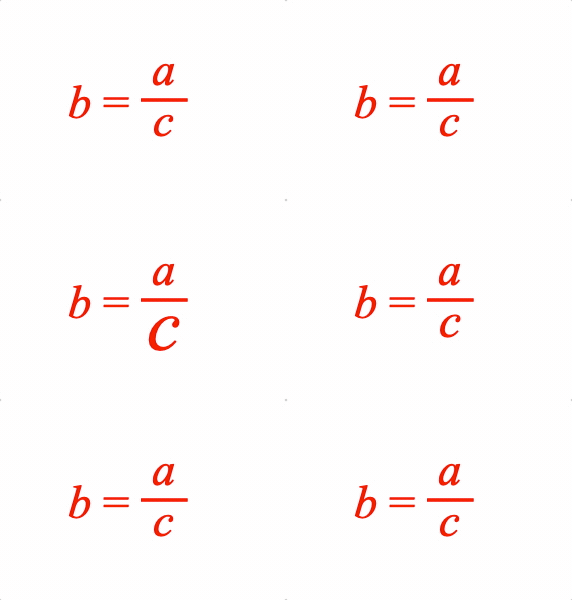
For example, an element can be pulsed:
// Pulse the c element
equation.showForm('b')
const c = figure.getElement('equation.c');
c.pulse({ scale: 2, yAlign: 'top' });
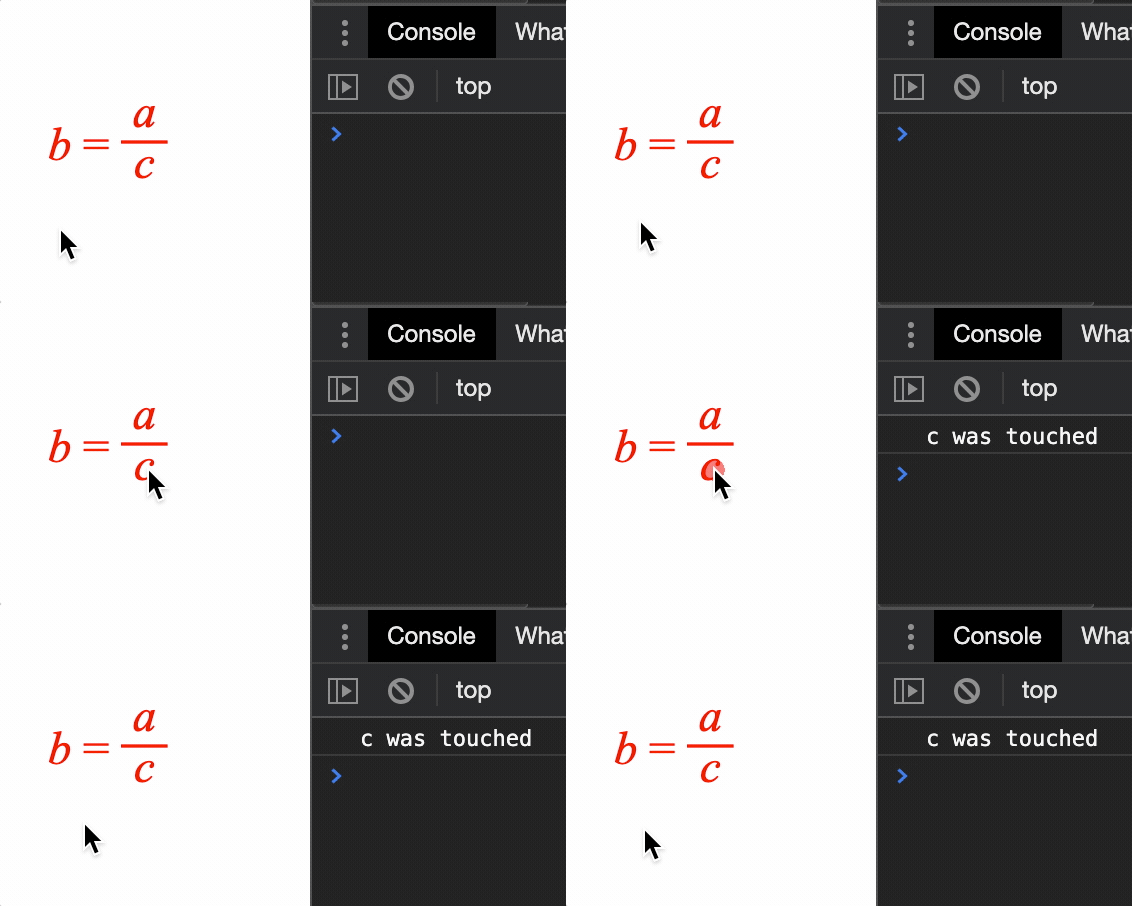
An element can be touched:
c.setTouchable();
c.onClick = () => { console.log('c was touched') }
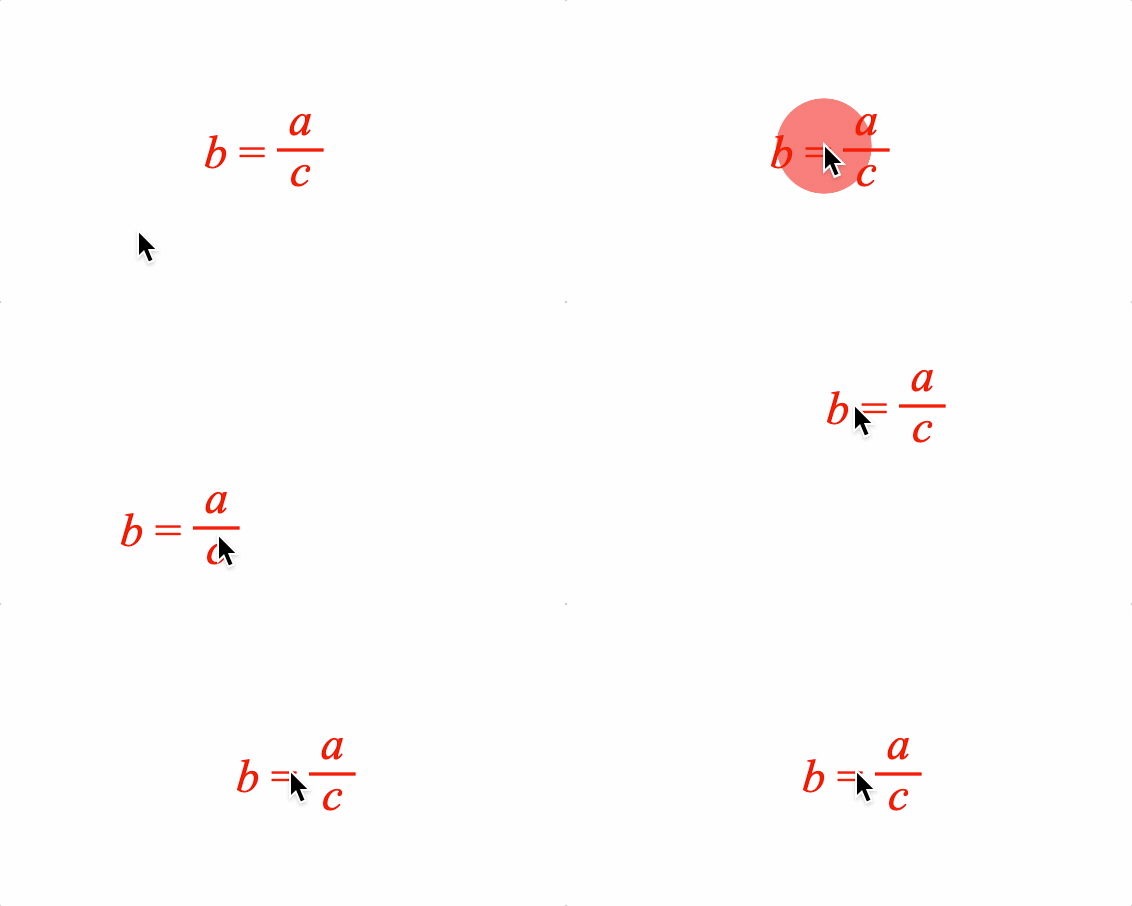
And the equation can be moved:
equation.setMovable();
Managing Equations
Complicated equations can have long definitions that may be hard to read.
Therefore there are several useful shortcuts when defining equations that are useful to improve readability.
Inline element definitions
Equation elements can all be defined in the elements property. However, simple elements that have the same text as its unique identifier can be defined inline.
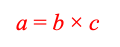
For instance, we can recreate the example above as:
const equation = figure.add({
make: 'equation',
elements: {
times: ' \u00D7 ',
equals: ' = ',
c: { color: [0, 0, 1, 1] },
},
forms: {
1: ['a', 'equals', 'b', 'times', 'c'],
},
});
Elements 'a' and 'b' are defined inline. 'c' is still defined in the elements as it has a color customization. Its definition is shorter however, as the text property is not required if the text is the same as the unique identifier.
Elements defined inline can be used in other forms:
const eqn = figure.add({
make: 'equation',
elements: {
times: ' \u00D7 ',
equals: ' = ',
v: { symbol: 'vinculum' },
},
forms: {
1: ['a', 'equals', 'b', 'times', 'c'],
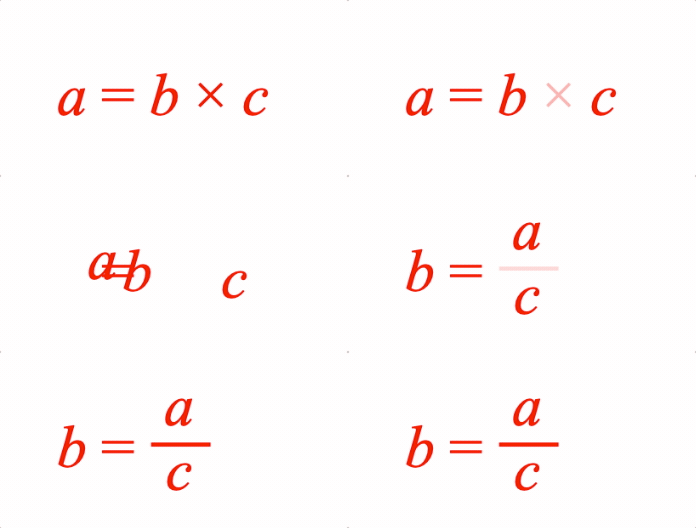
2: ['b', 'equals', { frac: ['a', 'v', 'c'] }],
},
});
eqn.showForm('1');
eqn.goToForm({
form: 2,
animate: 'move',
delay: 1,
});
Even symbols can be defined inline:
figure.add({
make: 'equation',
elements: {
equals: ' = ',
},
forms: {
1: ['b', 'equals', { frac: ['a', 'vinculum', 'c'] }],
},
});
Underscores have a special meaning for inline definitions.
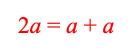
Underscores before text will be hidden when rendered, but can make unique ids that are valid javascript object keys (a requirement for a unique id). In javascript, a space cannot be the first character of an object key, but it can be after the first character.
Underscores after text can be used to create unique identifiers and therefore used to make multiple elements with the same text. The underscore, and all text after it will not be rendered.
figure.add({
make: 'equation',
forms: {
1: ['2', 'a', '_ = ', 'a_1', '_ + ', 'a_2'],
},
});
Underscores can also be used to give inline symbol definitions unqiue identifiers. In this case, the text before the underscore is the unique identifier, and the text after defines the symbol.
const eqn = figure.add({
name: 'eqn',
make: 'equation',
forms: {
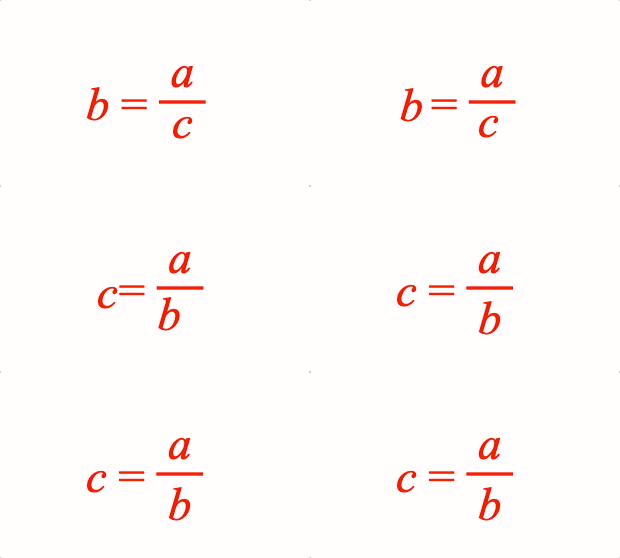
1: ['b', '_ = ', { frac: ['a', 'v_vinculum', 'c'] }],
2: ['c', '_ = ', { frac: ['a', 'v', 'b'] }],
},
});
eqn.goToForm({
form: '2',
animate: 'move',
delay: 1,
});
Inline element creation with make
In addition to string-based inline definitions, elements of any type can be created directly in a form using the make property. This uses the same make values as Figure.add, and the element is created and registered automatically.
figure.add({
make: 'equation',
forms: {
// Create a text element with custom styling inline
1: ['a', '_ = ', { make: 'text', name: 'B', text: { text: 'B' }, style: 'normal' }],
// Create any element type, such as a polygon
2: ['a', '_ = ', { make: 'polygon', name: 'p', radius: 0.05, sides: 4, color: [0, 0, 1, 1] }],
},
});
If name is provided, the element can be referenced in other forms by that name. If name is omitted, a unique name is auto-generated. If a named element already exists, it is reused rather than recreated.
Function Definitions
Function definitions can either be array definitions (an equation phrase) or object definitions. Array definitions are useful in simple definitions with minimal layout customizations. Object definitions are more readable when many options are required to customize a layout, or the input to the functions are more complicated equation phrases.
Array definitions, or equation phrases, can also be spread over several lines to increase readability.
figure.add({
// name needs to be defined as it is used to get the element in the onClick method
name: 'eqn',
make: 'equation',
elements: {
v: { symbol: 'vinculum' },
},
forms: {
// Array definition for simple fraction
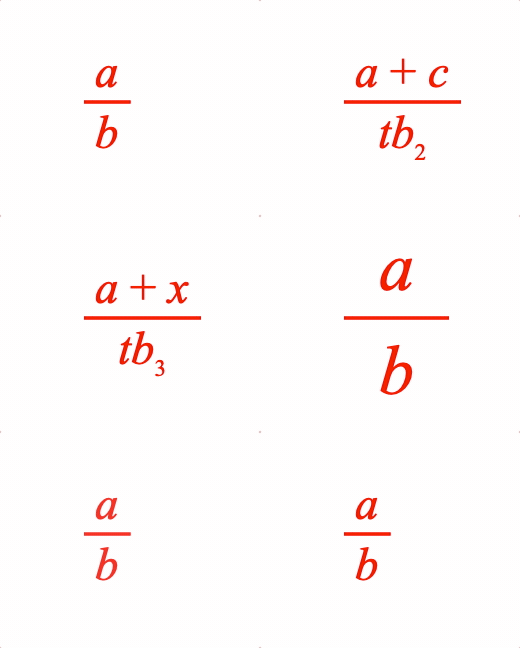
1: { frac: ['a', 'v', 'b']},
// Object definition for fraction with complex phrases
2: {
frac: {
numerator: ['a', '_ + ', 'c'],
symbol: 'v',
denominator: ['t', { sub: ['b', '2'] }],
},
},
// Array definition split over several lines
3: {
frac: [
['a', '_ + ', 'x'],
'v',
['t', { sub: ['b', '3'] }],
],
},
// Object definition when additional options are needed
4: {
frac: {
numerator: 'a',
symbol: 'v',
denominator: 'b',
numeratorSpace: 0.07,
denominatorSpace: 0.07,
overhang: 0.1,
scale: 1.5,
},
},
},
formSeries: ['1', '2', '3', '4'],
mods: {
isTouchable: true,
// eqn isn't instantiated when this is defined, so need to use the element's name
// to get the element at click time
onClick: () => figure.get('eqn').nextForm(),
touchBorder: 0.5,
}
});
Here, the touchability of the equation is setup in the mods property. The keys in mods represent property names of the equation FigureElementCollection.
The above example also uses a form series. A form series allows animation between equation forms using the equation.nextForm and equation.prevForm methods.
Phrases
Often different forms of an equation reuse equation phrases, like fractions. To make equation forms more readable, it can be useful to define a phrase once, and then refer to its identifier throughout the forms.
figure.add({
name: 'eqn',
make: 'equation',
elements: {
v: { symbol: 'vinculum' },
times: ' \u00d7 ',
div: ' \u00f7 ',
lb: { symbol: 'bracket', side: 'left' },
rb: { symbol: 'bracket', side: 'right' },
},
phrases: {
ac: ['a', '_ + ', 'c'],
// Phrases can be nested
br: { brac: ['lb', 'ac', 'rb'] },
},
forms: {
1: ['d', 'times', 'br'],
2: ['d', 'times', { bottomComment: ['br', ['div', 'b']] }],
3: ['d', 'times', { frac: ['ac', 'v', 'b']},],
},
formSeries: ['1', '2', '3'],
mods: {
onClick: () => figure.getElement('eqn').nextForm(),
touchBorder: 0.5,
isTouchable: true,
},
});
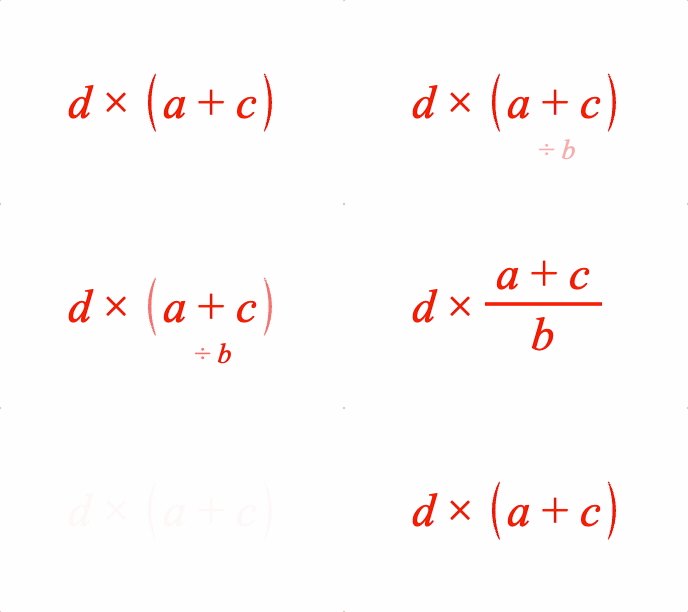
Element interaction
In the last two examples, equation touchability was setup in the mods property of the equation definition object. Similarly, equation elements can be set up in a similar way.
figure.add({
make: 'equation',
elements: {
a: {
mods: {
isTouchable: true, touchBorder: 0.1, onClick: () => console.log('a'),
},
},
b: {
isTouchable: true, touchBorder: 0.1, onClick: () => console.log('b'),
},
c: {
isTouchable: true, touchBorder: 0.1, onClick: () => console.log('c'),
},
times: ' \u00d7 ',
equals: ' = ',
},
forms: {
1: ['a', 'equals', 'b', 'times', 'c'],
},
});
Element 'a' is setup with the mods property. However, as isTouchable, touchBorder and onClick are frequenty used, they are also native options in the element definition object. As such, elements 'b' and 'c' do not use the mods property.