Interactive Video
With FigureOne, you can create a figure that can be both interactive and animated.
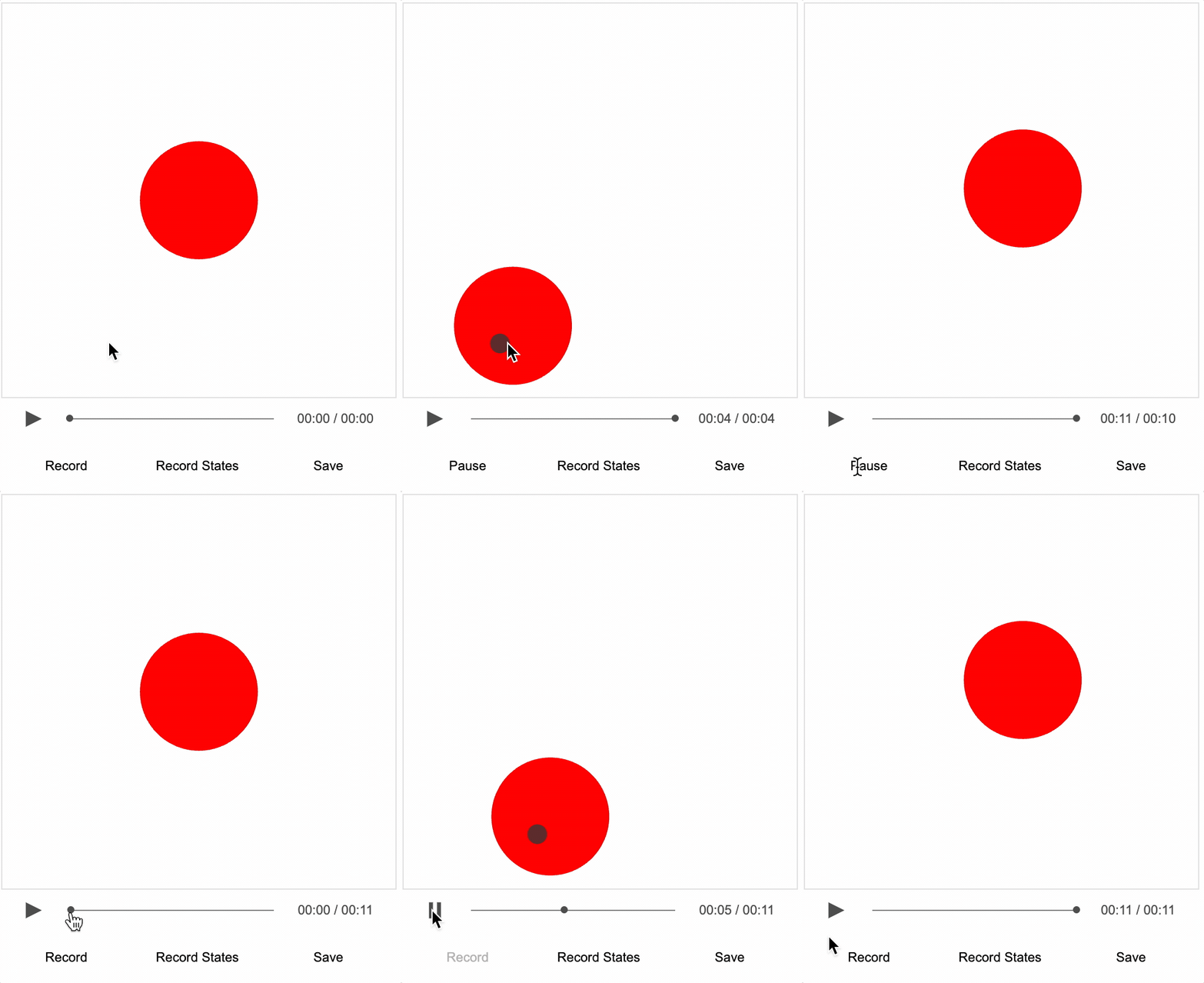
The evolution of this is interactive video, enabled by the Recorder class. For something to be video-like, it needs to have visual content, audio, and the ability to play, pause, stop and seek. The recorder class can:
- record and playback events, such as function calls, mouse movements, mouse clicks and slide navigation - these can either be recorded by a user, or programmed for specific times
- overlay an audio track on playback
- record entire figure state at regular intervals (e.g. 1 second) as seek frames for the video
- allow a user to pause video at any time and interact with the figure in its current state - on resuming playback, the figure will revert to its paused state
As such, the animation in FigureOne can be overlaid with audio to create a video like experience. Except in this case, content on the screen can be just as rich and interactive as that created normally with FigureOne.
State, Seeking and Pausing
Video seeking and pausing is enabled by recording and setting figure state.
A FigureOne diagram may contain numerous FigureElements arranged in a hierarchy of collections that group elements. Each FigureElement has properties that define how it behaves and is displayed, such as its visibility, color, transform, current or pending animations, and its behavior when touched or moved. These properties change over time, such as with animations and interactive actions from the user. We use the term 'state' to describe a snapshot of these property values at some instant in time. As such, individual FigureElements can have a state, and the state of all elements together is called the Figure state.
Part of creating a FigureOne interactive video, is to record figure state at regular intervals. These states are the seek frames. As a user is scrubbing through a video with the seek bar, the figure will be set into the state closest to the seek time. When play is pressed, the video will resume from this state.
Video pausing can happen at any time. Therefore, on pause, the figure state is captured and saved. If the figure is interacted with, and its state changes, then when play is resumed the pause state will be reloaded and playback will resume.
Note however that figure state only captures some of the figure state. For each FigureElement a state capture will include the properties:
animations,coloropacitydimColordefaultColortransformisShownisMovableisTouchablestatemovenotificationscustomState
So that means if the element manages a drawingObject whose vertices change over time, then the vertices will need to be updated when state is set. Use the setState notification from the notifications property of the element to do this.
Video Track
The video track of a FigureOne video contains the recorded event and state information. It is stored in json format, and so all information within it must be stringify-able. Therefore only numbers, booleans, strings and nested objects or arrays with the same types are acceptable.
However, some state information will refer to functions. For example, a trigger animation step has a callback function it needs to trigger. So how can you convert a function to a string?
FigureOne has a FunctionMap class which is a map of identifier strings to functions. When the figure is first loaded, functions are defined and stored in the map. When the functions need to be executed, the string is passed to the FunctionMap which then executes the associated function. When the function execution is recorded, just the string id and any associated parameters (that are also stringify-able) are recorded.
The Figure and each FigureElement within it has an fnMap property which is a local FunctionMap. Each FunctionMap also have a link to a global map of functions at fnMap.global. FunctionMap will first try to execute a method from its local map. If it doesn't exist, then it will try the global map.
Functions can be added to FunctionMaps with the add() method and executed with the exec() method.
For example, to add a function toConsole to a FunctionMap and then execute it while passing in a parameter you can:
figure.fnMap.add('toConsole', s => console.log(s));
figure.fnMap.exec('toConsole', 'hello');
Advantages compared to Traditional Video
Interactivity
FigureOne videos can be made to be interactive. FigureOne elements, be they shapes, text or equations can all be made interactive and so video-like experiences can be made that are similarly interactive.
Some examples of how this could be used are:
- Allow users to manipulate a diagram to help solidfy a concept being explained midway through a video
- Allow users to explore and reformat presented data and/or plots
- Allow feedback from users directly in the video, like with embedded quizzes
- Allow users to discover concepts by providing interative tools, showing them how to experiment with the tools to discover some concept, and giving them hints along the way
File Size and Resolution
Similar to traditional videos, FigureOne interactive videos have a video and an audio track.
The audio track of both traditional and interactive video is similar, and has the same size vs quality trade-offs. For podcast like quality, a 64kbps mp3 file might be approximately 0.5MB/minute.
A traditional video track needs to store information for each pixel on each frame of the video. While significant compression is achieved in modern video, video file sizes are still considerable. For 1080p video at 30 fps it may take upwards of 20MB/minute, and for 4k video upwards of 90MB/minute. Traditional video is both resolution and frame rate dependent. As such, videos are often encoded with multiple resolutions for efficient deployment to clients with different screen resolutions and bandwidth capabilities.
In comparison, a FigureOne video track stores just the construction information of the figure elements on the screen, and how they are animating. This information can be stored as zipped json data, and is small. It is neither resolution nor frame rate dependant. For example, the compressed video data of example Trig 2 - Names is just 69kB for 4:27 minutes of video. Compared with what might be closer to 90MB for 1080p, this is a 1500x saving. In this case, the audio is the largest component of the video package at 2.1MB.
Thus, you might say that FigureOne video is video for the size of an audio file.
A helpful analogy comparing traditional video to FigureOne interactive video is that of a bitmap image file (traditional video) to a vector image file (FigureOne interactive video).
Disadvantages compared to Traditional Video
Creation Complexity
A FigureOne interactive video is created using javascript code. Though much can be simplified down to json like objects, it is still useful to have some programming experience - especially for complex interactivity.
In comparison, traditional videos can be created by a broader range of people with relatively easy to use equipment and video editing software.
Content Complexity
The complexity of the video content (number of different colored pixels and how often they change) on a traditional video impacts the size of the video, but has less impact on the final performance of displaying the video on the client device. Most client devices have significant optization at the OS and often hardware level to make playing video fast and smooth.
FigureOne interactive video is not a standard, and its performance is limited by the client's browser performance. On each video frame, FigureOne needs to calculate the video state and render it to the screen. To achive relatively smooth video, FigureOne needs render a frame in less than 15-20ms.
FigureOne uses WebGL for hardware accelarated graphics performance and so complex figures with lots vertices and animations can be created to perform well (>25 fps) on low end, or old client devices. However, if a figure contains hundreds of different elements, all shown and moving at the same time, then care needs to be taken to optimize the video for performance. As the content complexity increases significantly, the creation complexity increases to keep performance acceptable.
Full Screen Behavior in Safari
FigureOne is a javascript library that can be used in the browser, or in app frameworks that support javascript modules.
On iOS devices, Safari allows traditional video content to fully cover the screen (without menu bars) in landscape mode. This isn't available for other web content, and so for FigureOne to emulate a video experience in the browser then either the video height needs to be reduced, or the top portion of the video should have limited interactivity (as touching the top of the screen in landscape can show the menus).
Important Note
To significanty reduce the size of the seek states, states are generally saved as a delta to some reference state which is generated when the recorder starts, or when triggered with addCurrentStateAsReference.
Important note: within a state, if an array length is less than the length of the corresponding array in the reference state, then it will be padded with
undefinedelements to be the same length as in the reference.
This isn't ideal, and will be fixed in a future release.