Morphing
A shape morphs when its vertices change relative to each other. For example, a square would morph into a circle.

Morph using updatePoints
FigureElementPrimitives generally come with an updatePoints method, which changes the vertices of a shape. If updatePoints is called on each animation frame, the shape can morph from one shape to another.
For instance, if we want to morph a straight line into a wave we could:
const figure = new Fig.Figure();
const sin = (mag) => {
const xValues = Fig.range(-0.8, 0.8, 0.001);
return xValues.map(x => [x, mag * Math.sin(2 * Math.PI * x / 0.5)]);
};
const line = figure.add({
make: 'polyline',
points: sin(0),
width: 0.03,
color: [1, 0, 0, 1],
simple: true,
});
line.animations.new()
.delay(1)
.custom({
callback: p => line.custom.updatePoints({ points: sin(p / 2) }),
progression: 'easeinout',
duration: 2,
})
.start();

This works fine, even on low end clients. For example, a low end 2016 Chromebook can render this at over 40 frames per second. This example is a polyline of 1600 points, resulting in 6400 vertices, and you can do a lot with that.
However, if we increase this by an order of magnitude (polyline 16,000 points, 64,000 vertices), then the frame rate drops to 1-2 fps.
There are two reasons for this:
- Calculations: each frame 16,000 polyline points need to be calculated, followed by the calculation of 64,000 vertices to give the line thickness
- Memory: each frame, all vertices need to be transferred from a CPU related memory location to a GPU memory buffer
In this example 1) is probably more expensive than 2), but there will be other times where 2) is more expensive than 1).
So updatePoints is an easy and sufficient way to morph many things, but it will struggle when the number of vertices gets too high.
FigureElementPrimitive Morph
FigureOne has a FigureElementPrimitiveMorph optimized for morphing many vertices.
At initialization, multiple arrays are defined, and then loaded into GPU memory buffers. FigureElementPrimitiveMorph then animates between these point arrays by translating corresponding points in the GPU. This means on each animation frame there are no calculations done in the CPU, and no large memory buffers being transferred to the GPU.
As a result, hundreds of thousands of points can be morphed with minimal performance impact - even on low end clients.
A simple example using morph on just three vertices is:
const figure = new Fig.Figure();
const tri = figure.add({
make: 'morph',
points: [
[0, 0, 0.5, 0, 0.5, 0.5],
[0, 0, 0.5, 0, 0, 0.5],
],
color: [1, 0, 0, 1],
});
tri.animations.new()
.morph({ start: 0, target: 1, duration: 3 })
.start();

The points property defines the different vertex configurations. The first array of points, representing the first vertex configuration is [0, 0, 0.5, 0, 0.5, 0.5] which defines three points [0, 0], [0.5, 0], and [0.5, 0.5].
The morph primitive comes with a built-in morph animation step, which can animate between configurations. This animation step is only available to FigureElementPrimitiveMorph primitives.
Let's now recreate the line to wave example above using morph.
const figure = new Fig.Figure();
const sin = (mag) => {
const xValues = Fig.range(-0.8, 0.8, 0.001);
return xValues.map(x => [x, mag * Math.sin(2 * Math.PI * x / 0.5)]);
};
const { pointsToShapes } = Fig.morph;
const [line] = pointsToShapes({
points: sin(0),
shape: 'hex',
});
const [sine] = pointsToShapes({
points: sin(0.5),
close: true,
shape: 'hex',
});
const m = figure.add({
make: 'morph',
points: [line, sine],
color: [1, 0, 0, 1],
});
m.animations.new()
.delay(1)
.morph({ start: 0, target: 1, duration: 10 })
.start();
Instead of morphing a polyline as before, we are now morphing a series of shapes distributed along a polyline. In this case the shapes are hexagons. If the shapes have more sides, the curves will look more natural for thicker lines. For this line thickness, hexagons are a good trade-off. For thinner lines, squares could be used, and for thicker lines polygons with more sides would be required.
This example comprises 1600 shapes along the line, each shape being 12 vertices - giving a total of 19,200 vertices.
The power of the morph primitive can be seen when using large numbers of vertices. When we increase the number of vertices by two orders of magnitude:
const sin = (mag) => {
const xValues = Fig.range(-0.8, 0.8, 0.00001);
return xValues.map(x => [x, mag * Math.sin(2 * Math.PI * x / 0.5)]);
};
we can still achieve 25 fps on the 2016 Chromebook, while morphing 1.9 million vertices.
Tips for Morphing Lines
It will often take fewer vertices to construct a polyline with rectangular line segments between polyline corners, compared to a string of shapes along the polyline. This is especially the case when the polyline has straight segments that are longer than the required distance between shapes needed to make the line look smooth (usually a fraction of the shape with).
Nevertheless, most times it will be better to use a string of shapes to represent a morphing line, as the line will look more natural during the morph.
The FigureElementPrimitiveMorph primitive linearly translates all vertices from one location to another. If a rectangular line segment's angle changes significantly, the transition between the two states may involve the rectange width temporarily reducing.
An extreme example is when we change angle by 180º:
const figure = new Fig.Figure();
const { polyline } = Fig.morph;
const line = figure.add({
make: 'morph',
points: [
polyline({ points: [[0, 0], [0.5, 0]], width: 0.04 }),
polyline({ points: [[0, 0], [-0.5, 0]], width: 0.04 }),
],
color: [1, 0, 0, 1],
});
line.animations.new()
.morph({ start: 0, target: 1, duration: 4 })
.start();

Compare this to a string of points that has no width change:
const figure = new Fig.Figure();
const { polylineToShapes } = Fig.morph;
const line = figure.add({
make: 'morph',
points: [
polylineToShapes({ points: [[0, 0], [0.5, 0]], num: 20, size: 0.04 })[0],
polylineToShapes({ points: [[0, 0], [-0.5, 0]], num: 20, size: 0.04 })[0],
],
color: [1, 0, 0, 1],
});
line.animations.new()
.morph({ start: 0, target: 1, duration: 3 })
.start();

Trade-offs
Morphing hundreds of thousands of points with minimal performance impact is useful for many situations, but will not solve every problem.
This approach is good for problems with deterministic start and end states (meaning you can calculate the point arrays at initialization).
The challenges with this approach are:
- translation between corresponding vertices is linear - so if for example you want a line to uncurl in a very specific way, then using
updatePointsor a custom shader will be a better solution - vertex configurations that cannot be pre-caclculated cannot be handled - so if for example user feedback is morphing a shape unpredictably in real time, then
updatePointsor a custom shader will be a better solution
Morph Tools
FigureOne has a number of tools that can create vertices ready for morphing:
- pointsToShapes can create a number of shapes centered at defined points
- polylineToShapes can distribute a number of shapes along a polyline
- imageToShapes can create a number of shapes from pixels of an image
- polygonCloudShapes can create a number of shapes distributed randomly within a polygon border
- circleCloudShapes can create a number of shapes distributed randomly within a circle border
- rectangleCloudShapes can create a number of shapes distributed randomly within a rectangle border
- getPolygonCorners can calulate the corner points of a polygon
- polyline can create vertices that represent a polyline with some width
Generic Morphing
It can be challenging to construct vertices that represent a relatively arbitrary shape. It is even tougher to align those vertices to those in another shape so the two shapes can be morphed.
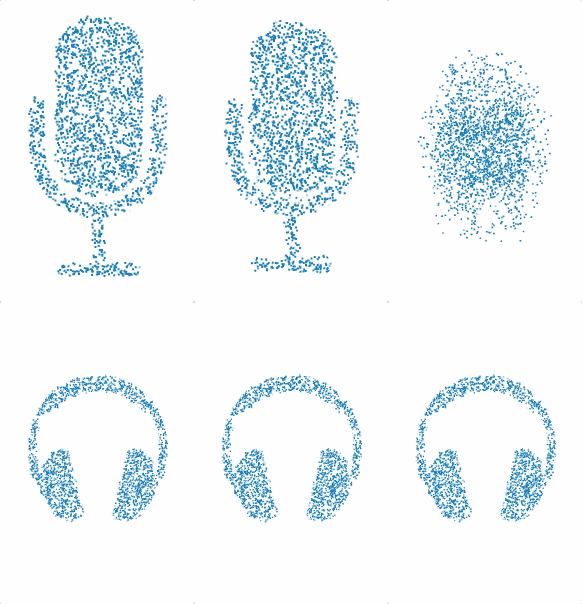
imageToShapes can help with this problem (to a degree), as it can scan an image and create shapes that represent the pixels of that image. Additionally, filters can be used to only create shapes for some pixels. So for example if you have a shape with a transparent background, you can use a filter that rejects transparent pixels and only processes pixels with a color.
const figure = new Fig.Figure();
const { imageToShapes } = Fig.morph;
const micImage = new Image();
micImage.src = './mic.png';
const headphonesImage = new Image();
headphonesImage.src = './headphones.png';
let index = 0;
const loaded = () => {
index += 1;
if (index < 2) {
return;
}
const [mic, micColors] = imageToShapes({
image: micImage,
width: 0.7,
filter: c => c[3] > 0,
});
const [headphones, headphoneColors] = imageToShapes({
image: headphonesImage,
width: 0.7,
filter: c => c[3] > 0,
num: mic.length / 6 / 2,
});
const m = figure.add({
make: 'morph',
points: [mic, headphones],
color: [micColors, headphoneColors],
});
m.animations.new()
.delay(1)
.morph({ start: 0, target: 1, duration: 2 })
.start();
};
micImage.onload = loaded.bind(this);
headphonesImage.onload = loaded.bind(this);
};

The mic image has 31,720 pixels, which we are reducing to 17,516 pixels by filtering out the completely transparent pixels (we are keeping semi-transparent pixels as they make the transitions from opaque pixels to transparent pixels look more natural). This means that even though these images are relatively small, we are still creating 105,096 vertices.
For larger images, consider reducing the vertices by just taking a random sampling of pixels from the image. This produces a cloud like effect for the image, and it won't always be appropriate, but in this case we will reduce the number of vertices by almost an order of magnitude and still communicate the same information.
In the prior example, we are loading the first image, and using the number of shapes produced to define the number of shapes for the second image (as the second image has less colored pixels than the first).
This time, we will limit the number of shapes to just 2000 per image. We will play with the shape size, and force a dither (random offset) to the pixels to make the spaces look intentional. The result is just 12,000 vertices.
const figure = new Fig.Figure();
const { imageToShapes } = Fig.morph;
const micImage = new Image();
micImage.src = './mic.png';
const headphonesImage = new Image();
headphonesImage.src = './headphones.png';
let index = 0;
const loaded = () => {
index += 1;
if (index < 2) {
return;
}
const num = 2000;
const [mic, micColors] = imageToShapes({
image: micImage,
width: 0.7,
filter: c => c[3] > 0,
num,
size: 0.01,
dither: 0.005,
});
const [headphones, headphoneColors] = imageToShapes({
image: headphonesImage,
width: 0.7,
filter: c => c[3] > 0,
num,
size: 0.007,
dither: 0.005,
});
const m = figure.add({
make: 'morph',
points: [mic, headphones],
color: [micColors, headphoneColors],
});
m.animations.new()
.delay(1)
.morph({ start: 0, target: 1, duration: 2 })
.start();
};
micImage.onload = loaded.bind(this);
headphonesImage.onload = loaded.bind(this);