2D Shape Primitives
Each FigureElementPrimitive element manages drawing a shape, drawing text, or manipulating a HTML element.
FigureOne's built-in shapes are drawn using WebGL, which uses triangles to create different shapes. To draw a shape, you define the verticies of the triangles. Every drawing frame (animation or screen refresh), the color of the vertices and the transform that moves them around is used to render the final shape to the screen.
Shapes Boilerplate
To test examples within the 'Shapes' sections of the API reference create an index.html file and index.js file.
All examples are snippets which can be appended to the end of the index.js file.
<!-- index.html -->
<!doctype html>
<html>
<body>
<div id="figureOneContainer" style="width: 800px; height: 800px; background-color: white;">
</div>
<script type="text/javascript" src='https://cdn.jsdelivr.net/npm/figureone@0.15.10/figureone.min.js'></script>
<script type="text/javascript" src='./index.js'></script>
</body>
</html>
// index.js
const figure = new Fig.Figure({ scene: [-3, -3, 3, 3], color: [1, 0, 0, 1], lineWidth: 0.01, font: { size: 0.1 } });
Quick Start
Let's start by creating a FigureElementPrimitive element that draws a polygon and adding it to the figure.
// create the `FigureElementPrimitive`
const p = figure.primitives.polygon({
name: 'p',
radius: 0.2,
color: [0, 0, 1, 1],
sides: 6,
});
// add it to the figure
figure.add(p);
Another way to create and add the same shape to the figure is to use the Figure.add method with an options definition of a polygon:
figure.add({
name: 'p',
make: 'polygon',
radius: 0.2,
color: [0, 0, 1, 1],
sides: 6,
});
Both ways create the same element. The first way is especially useful when extending shape creation classes, or creating elements dynamically. The second way can allow you to layout an entire figure in a single object that is compatible with JSON. This means it is relatively straight forward to share figure elements between projects. When using code folding in an IDE, the second way also makes it easy to work with a figure's with many elements by hiding elements that aren't being worked on.
For most of the API reference, the second way will be used.
Also note that for both examples the name property was used. It is often not necessary to use it, and it will only be used sometimes within the API reference. The three reasons to use it are:
- Makes code more readable - especially for figures with lots of elements
- Makes debugging easier
- Naming elements makes accessing elements within a figure using the
getmethod easier
Built-in Shapes
There are several built in primitive shape methods that can be used to create complex figures:
Drawing a generic shape
While there are several built-in shapes such as polygons, rectangles and polylines in FigureOne, there is also a 'generic' method that will allow creation of any shape. In fact, all the built in shapes use this generic method themselves.
To use the generic method however, it is important to understand how WebGL uses triangles to create shapes.
Any shape approximated with triangles. For instance, the figure below shows a rectangle broken into two triangles with vertices labeled.
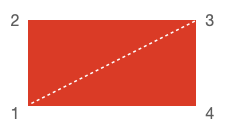
To draw this shape, you would need to draw the two triangles, which means drawing 6 vertices:
- 1, 2, 3
- 1, 3, 4
figure.add({
name: 'rectangle',
make: 'generic',
points: [
[-2, -1], [-2, 1], [2, 1],
[-2, -1], [2, 1], [2, -1],
],
drawType: 'TRIANGLES',
});
This method will be able to draw almost anything.
However, for some shapes there are simpler ways to draw the same thing with fewer repeated vertices.
drawType: 'STRIP'
A strip starts with one triangle, and then every subsequent vertex will create a triangle with the last two vertices.
Therefore, to draw the same rectangle we would draw the first triangle with the vertices 2, 1 and then 3. Then 1 and 3 could be used with 4 to create the second triangle.
figure.add({
name: 'rectangle',
make: 'generic',
points: [
[-2, 1], [-2, -1], [2, 1], // first triangle
[2, -1], // second triangle formed with vertices 1 and 3
],
drawType: 'STRIP',
});
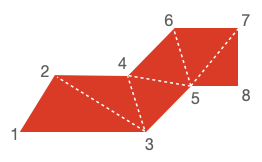
This method works well for continuous shapes, but will not work for shapes that have gaps.
A good example of a shape that works with 'STRIP' is below. The vertices are labeled in the order they would be defined.
drawType: 'FAN'
A fan starts with one point. The next two points create the first triangle, and then every subsequent point uses the first and last point to create the next triangle.
Therefore, to draw the same rectangle we would draw the first point 1, then complete the first triangle with 2 and 3. Then we would draw point 4 to make the second triangle with points 1 and 3.
figure.add({
name: 'rectangle',
make: 'generic',
points: [
[-2, -1], // first point (vertex 1)
[-2, 1], [2, 1], // complete first triangle (vertices 2, 3)
[2, -1], // second triangle formed with first and last vertex (1, 3)
],
drawType: 'FAN',
});
This method works for any shape that can be broken into triangles that all share a common point. For example:
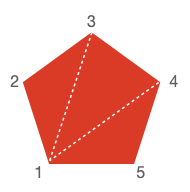
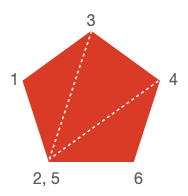
Note, 'STRIP' can create any shape 'FAN' can, but it can be a little more involved. For instance, the shape above would need to duplicate one of the vertices to fully fill it:
drawType: 'LINES'
'LINES' is the final style that WebGL accepts for drawing primitives. In this case vertex pairs are used to create lines.
This is not useful for drawing filled shapes, but is useful for drawing thin outlines.
For instance, to draw a rectangle outline:
figure.add({
name: 'rectangle',
make: 'generic',
points: [
[-2, -1], [-2, 1], // left edge
[-2, 1], [2, 1], // top edge
[2, 1], [2, -1], // right edge
[2, -1], [-2, -1], // bottom edge
],
drawType: 'LINES',
});